Igor Uduslivii2020Casual, Arcade
332.9MBBuild 24935786Updated 89 days ago
About Progressbar95
Progressbar95 is a unique indie game with a strong nostalgic vibe. It turns vintage GUI elements like panels, buttons and icons into game elements! Simple and addictive gameplay based on dozens of mini-games and puzzles. The game will make you smile!
Progressbar95 is a unique indie game with a strong nostalgic vibe. Fights against virtual office assistants, calculators, annoying pop-ups and maddening visual glitches. Surf the good old internet. Use a terminal to hack thing and search for bonuses. The game will make you smile!
Progressbar95 Game Features:
- Simple and addictive gameplay based on dozens of mini-games and puzzles
- Creative and funny game modes: 3d Progresstein, Progressolitaire, Pinball, Progress XL, Progress Sweeper and many more
- Built-in text-based adventure based on DOS
- Tons of secrets and Easter eggs for players to search for
- A powerful system of upgrades, turn your 386 PC into a supercomputer!
- More than 40 systems to unlock including a alternative lineup called BarOS
- 8-bit computers with built-in BASIC to create small programs and get bonuses
- Compact computers powered by Progressbar PE
- A digital pet in a form of a trash bin! You have to feed and take care of him to get bonuses
- Built-in 'old good Internet' to discover (the dial noises are included as well)
- Original soundtrack by Gemfire
- Achievements and missions
- Modding support
Progressbar95 systems:
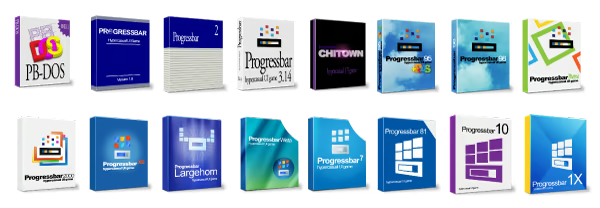
The game includes dozens of systems (skins) with each own unique design and mechanics. You may got something very modern like Progressbar 1X or very vintage like text-based shell PB DOS shell.

From the store page, unedited. May contain spoilers.
This release
Reviews and playtime
Overwhelmingly Positive
96% of 3,516
The game
Genres and features
How to install Progressbar95
Pre-installed, so there is no setup wizard. Follow these in order.
- 01
Create a games folder
Make a folder like C:\Games\ and keep every game in it. Avoid Program Files, Downloads and the Desktop.
- 02
Exclude it from Windows Defender
Defender often deletes cracked files by mistake while they extract. Add C:\Games\ as an excluded folder:
Windows Security -> Virus & threat protection -> Manage settings -> Exclusions -> Add an exclusion -> Folder
- 03
Download into C:\Games\
Save the archive straight into that folder. This release is one 332.9MB file.
- 04
Extract it there
Use 7-Zip or WinRAR. Keep about 732.4 MB free while it unpacks.
- One file
- Right-click it -> Extract here.
- Several parts
- Extract only part1 (or .001). The other parts are read automatically.
- 05
Open README.html
It is inside the extracted folder and explains how to start the game.
Still stuck? Read the install help
Download
Set up your games folder and the Defender exclusion before you extract. The Install tab has the steps.
FileDitch
The whole game in one file
FileQ
The whole game in one file
Gofile (legacy)
The whole game in one file
We don't accept fix requests when only one host is down. Please use another mirror above. Links broken? Let us know.
We never password-protect files or hide installers. If a page asks for a password or payment, that is the host's ad, not us. See our safety guide.
System requirements
- Min
- 1 GHz processor
- Rec
- 1.3 GHz processor
- Min
- 1 GB RAM
- Rec
- 8 GB RAM
- Min
- OpenGL 2.1 or higher
- Rec
- OpenGL 4.0
- Min
- Version 9.0
- Rec
- Version 10
- Min
- 150 MB available space
- Rec
- 250 MB available space
Windows 10, Windows 8, Windows 7
These are the developer's listed requirements and may not be 100% accurate. If your specs fall below the minimum, try the game anyway; many games run fine below the listed requirements. When in doubt, check YouTube for performance benchmarks.